Enter this key during installetion and enjoy with genuine windows.
55274-64010-11873-23081
Showing posts with label Tips and Tricks. Show all posts
Showing posts with label Tips and Tricks. Show all posts
Wednesday, 1 August 2012
Tuesday, 20 March 2012
Windows xp tips by hitman
Windows XP Tips Collection
Here's how to check if your copy
of XP is Activated
Go to the run box and type in
oobe/msoobe /a
and hit ok ...theirs your answer
Windows Explorer Tip
When launched in Windows
Millennium/Win2k/
WinXP,Explorer by default will
open the "My Documents" folder.
Many people prefer the behavior
from previous versions of
Windows, where Windows
Explorer would open and display
"My Computer" instead of the
new way. To revert to the old
way [My Computer by default
rather than My Documents as the
default], simply edit the shortcut
to Windows Explorer, by right
clicking on it, and left clicking
"Properties" and changing the
"Target" box to: "C:\WINDOWS
\EXPLORER.EXE /n,/e," [adjust the
path/drive letter if needed]. The
key is to add the "/n,/e," to the
end of the shortcut (don't type
the quotes).
Backup your Fresh install
Here's how to check if your copy
of XP is Activated
Go to the run box and type in
oobe/msoobe /a
and hit ok ...theirs your answer
Windows Explorer Tip
When launched in Windows
Millennium/Win2k/
WinXP,Explorer by default will
open the "My Documents" folder.
Many people prefer the behavior
from previous versions of
Windows, where Windows
Explorer would open and display
"My Computer" instead of the
new way. To revert to the old
way [My Computer by default
rather than My Documents as the
default], simply edit the shortcut
to Windows Explorer, by right
clicking on it, and left clicking
"Properties" and changing the
"Target" box to: "C:\WINDOWS
\EXPLORER.EXE /n,/e," [adjust the
path/drive letter if needed]. The
key is to add the "/n,/e," to the
end of the shortcut (don't type
the quotes).
Backup your Fresh install

Google search all codes by hitman
google serch all codes
Index of /admin
Index of /passwd
Index of /password
Index of /mail
"Index of /" +passwd
"Index of /" +password.txt
"Index of /" +.htaccess
"Index of /secret"
"Index of /confidential"
"Index of /root"
"Index of /cgi-bin"
"Index of /credit-card"
"Index of /logs"
"Index of /config"
Looking for vulnerable sites or
servers using “inurl:” or
“allinurl:”
a. Using “allinurl:winnt/
system32/” (without quotes) will
list
down all the links to the server
which gives access to
restricted directories like
“system32” through web. If you
are
Index of /admin
Index of /passwd
Index of /password
Index of /mail
"Index of /" +passwd
"Index of /" +password.txt
"Index of /" +.htaccess
"Index of /secret"
"Index of /confidential"
"Index of /root"
"Index of /cgi-bin"
"Index of /credit-card"
"Index of /logs"
"Index of /config"
Looking for vulnerable sites or
servers using “inurl:” or
“allinurl:”
a. Using “allinurl:winnt/
system32/” (without quotes) will
list
down all the links to the server
which gives access to
restricted directories like
“system32” through web. If you
are
Wednesday, 29 February 2012
Disable CD-ROM autoplay permanently in windows
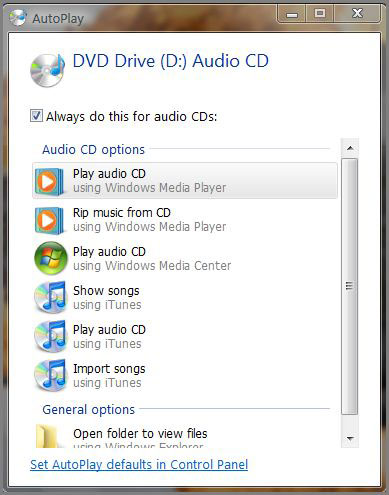
Description : As you notice in Windows whenever you insert a disk into disk drive it opens up the "AutoPlay" dialog box, Sometimes its OK to have a dialog box being opened like this, but sometimes it disturbs, its harassing: So! many of the people want to disable that "AutoPlay" dialog box permanently to avoid embarrassment:
To Disable that dialog box: here is the procedure
Procedure :To Disable that dialog box: here is the procedure
01: Open up "Registry Editor" ( To open it click Start | Click Run | Enter Commandregedit.exe | Hit Enter )
02: Select "HKEY_LOCAL_MACHINE\System\CurrentControlSet\Services\CdRom"
03: Double click on "Autorun"
04: Change the value from "1" to "0"
That's it you are done, Now whenever you insert a new disk into your Disk Drive, the autorun dialog box will not open...
Preview :"AutoRun " dialog box screenshots, Click to enlarge...

Tuesday, 17 January 2012
Lock your folder with password without software
Folder Lock without any S/W
Open Notepad and copy the below code and save as locker.bat. At first time start it will create folder with Locker automatically for u. Don’t forget to change your password in the code its shown the place where to type your password.
after creation of Locker folder again click on the locker.bat.it will ask.press Y then Locker folder will be disappeared. again to get it click on locker.bat. and give ur password u will get the folder again.
************ ********* ********* ********* ********* **********
cls
@ECHO OFF
title Folder Locker
if EXIST “Control Panel.{21EC2020- 3AEA-1069- A2DD-08002B30309 D}” goto UNLOCK
if NOT EXIST Locker goto MDLOCKER
:CONFIRM
echo Are you sure u want to Lock the folder(Y/N)
set/p “cho=>”
if %cho%==Y goto LOCK
if %cho%==y goto LOCK
if %cho%==n goto END
if %cho%==N goto END
echo Invalid choice.
goto CONFIRM
:LOCK
ren Locker “Control Panel.{21EC2020- 3AEA-1069- A2DD-08002B30309 D}”
attrib +h +s “Control Panel.{21EC2020- 3AEA-1069- A2DD-08002B30309 D}”
echo Folder locked
goto End
:UNLOCK
echo Enter password to Unlock folder
set/p “pass=>”
if NOT %pass%==type your password here goto FAIL
attrib -h -s “Control Panel.{21EC2020- 3AEA-1069- A2DD-08002B30309 D}”
ren “Control Panel.{21EC2020- 3AEA-1069- A2DD-08002B30309 D}” Locker
echo Folder Unlocked successfully
goto End
:FAIL
echo Invalid password
goto end
:MDLOCKER
md Locker
echo Locker created successfully
goto End
:End
Another way to secure your folder.
To lock a folder ::: Simplest WaY !!!
To lock a folder ::: Simplest WaY !!!
Hi friends try this..
first select a folder for example i’ll use a folder name movies in D drive D:\movies\
in the same drive u create a text file and type
ren movies movies.{21EC2020-3AEA-1069-A2DD-08002B30309D}
and save it as loc.bat
again u type in a notepad as
ren movies.{21EC2020-3AEA-1069-A2DD-08002B30309D} movies
and save it as key.bat
now in D drive u can see two batch files loc and key.. when u double click loc the movie folder will change to control panel and whn u double click key the control panel will change to normal folder..
You may also like -
Monday, 2 January 2012
HIDE FOLDERS WITHOUT SOFTWARE(with cmd prompt)
Generally we would see many instances of private folders hidden by softwares
but in this post i can reveal the secret of folderhiding with out softwarez.
following the sequence of steps below
01-create a Folder in C drive rename it as "XXX" without quotes.
02-Now open Command Prompt in the Start Menu.
03-Type "attrib +s +h C:\XXX" without quotes and then press enter.
04-This command will Make your folder invisble and it can't be seen even in searches ,hidden files and folders list.
05-To regain it type "attrib -s -h C:\abc"
06-You can lock any other folder(in other drives also) by just replacing the address of location of folder or file in place of C:\XXX
Subscribe to:
Posts (Atom)
Blogroll


Flag Counter
 Embed IP Address Widget Of Visitor On Your Blog Or Site


